 PesaCast
For shops, offices and developers
M-PESA payment notifications on your computer or server.
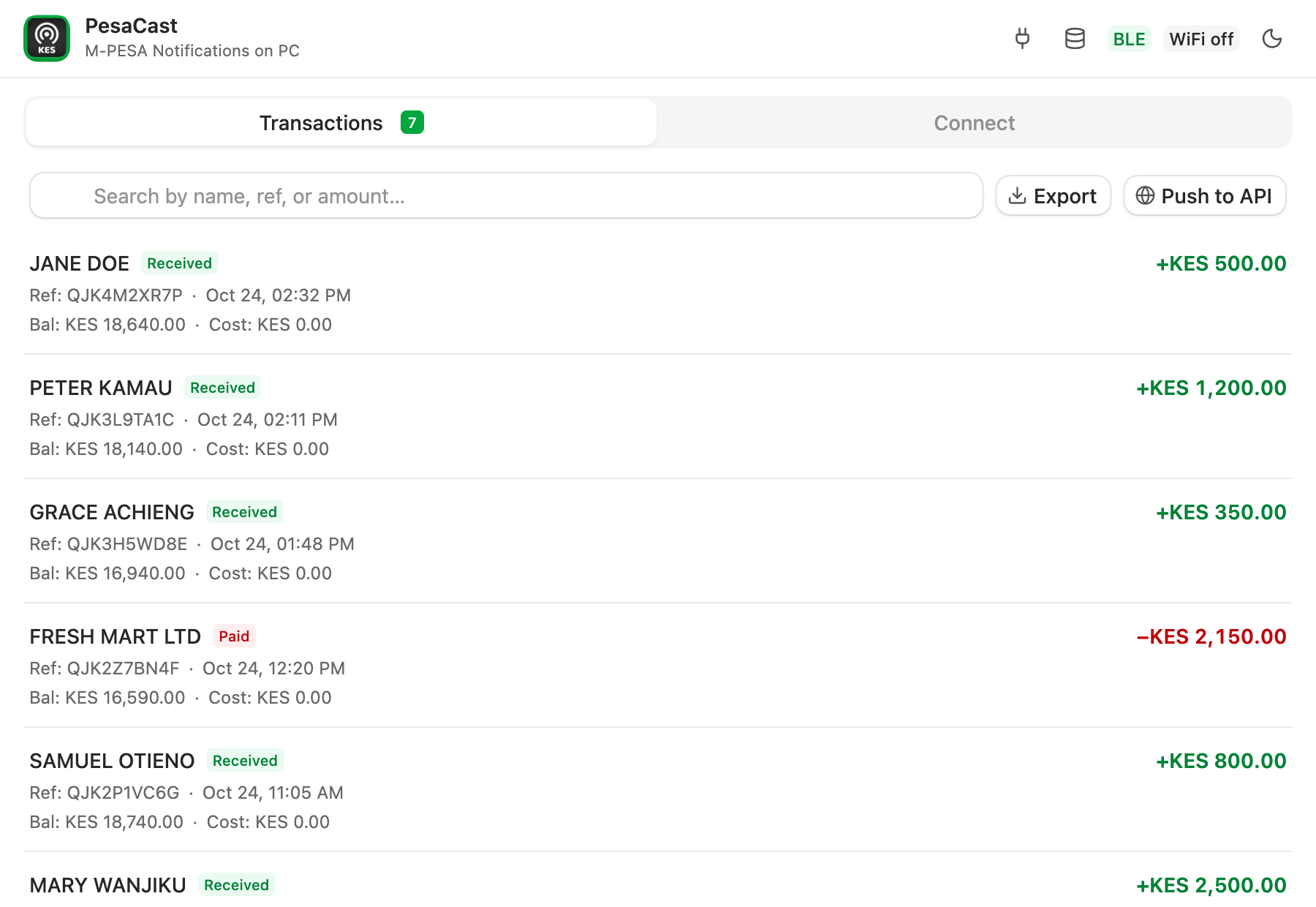
A free Android app for a spare phone. It reads each M-PESA text and sends a payment notification, with the amount, name and reference, where you choose. Every other message is ignored.
What it does
From the customer's phone to your screen, in three hops.
-
The phone reads the message.
Safaricom texts the phone for every payment. PesaCast, running on that phone, picks up messages from MPESA and turns each into an amount, a name, a reference and a balance.
-
It sends it where you point it.
To your computer over Bluetooth or your own Wi-Fi. Or to a web address you control, called a webhook. Or both. Nothing goes through a server of ours, because there is not one.
-
Your screen shows it.
A notification, and a live list on the desktop app. Nothing to refresh. Export the list to Excel when you need it.
What it does not do
Read this part before you rely on it for money.
- It is not proof of payment.
PesaCast forwards a text message. A text can be faked, delayed, or lost if the phone was off. If money or goods depend on a payment, confirm it with Safaricom’s Daraja callbacks and use PesaCast alongside them.
- It never touches your money or your PIN.
It cannot send money, cannot send SMS, and never asks for your M-PESA PIN. It only receives what arrives.
- It is not from Safaricom.
Independent, unofficial, and not affiliated with or endorsed by Safaricom.
- It is not on the Play Store.
You install it from a file. The setup guide shows how, and checks the file against a checksum before it goes on the phone.
- It will not make a cheap phone behave.
Many budget phones stop background apps to save battery. The setup checklist walks you through the settings that keep PesaCast alive, but some are menus only you can open. See phones.
- It only understands M-PESA.
Other wallets and banks send different messages. They are ignored.
Where your data goes
To the desktop app, straight from the phone, over an encrypted link on your own network. To your webhook, only if you turn it on, over HTTPS, to the address you typed. Nowhere else.
The desktop app checks GitHub for new versions. The code is open, so you can read exactly what the phone does with a message: how it stays yours.
Open source, and meant to be read
PesaCast is MIT licensed. Every line that touches your payments is public.
- Read the code.
The Android app, the desktop app and the message parser are all in one repository. The parser has tests built from real messages with the names and numbers removed.
- Check what you install.
The setup script checks the download against a published checksum before it goes on the phone. Every release lists its files on GitHub.
- Help or complain.
Open an issue, tell us how your phone behaved, or send a pull request. How to contribute.
Running a shop or an office?
About fifteen minutes: put the app on a spare Android phone, put the desktop app on a computer, pair them.
Building something?
Each payment can be posted, signed and retried, to your own server. The format is published as a schema, with a reference receiver.